I am a big fan of my Apple iPod, but I can't figure out how to have it automatically download the most recent podcast from the podcasts I subscribe to. I think there's something I can do in iTunes to get this to work, but I'm just not exactly sure how to proceed.
Dave's Answer:
Downloading and adding podcasts to your iPod and iPhone is relatively straight-forward. But once you are in your car and driving along, it can be tough to figure out what new podcasts you have available. For instance, you may subscribe to several daily podcasts and want to be able to listen to the latest episodes without navigating to the podcast menu, then the podcast name, then the episode.
By using iTunes' smart playlists feature, you can build a list of the most recently added podcasts. You can even filter by audio and video podcasts.
In iTunes, choose File, New Smart Playlist... This will bring up the Smart Playlist dialog:
Change the main setting to "Podcast" and "is true." Then, click on the "+" button to the right to add a second rule. Make this rule "Kind" "contains" "audio" as shown in the image. You can change this to "Video Kind" "is" and "Movie" for video podcasts. Now it should look like this:
Then also set the limit to 25 items, so your playlist doesn't include all your audio podcasts. Set "selected by" to "most recently added." Also, make sure "Live updating" is checked.
Now you have a list of the most recent podcasts in iTunes. To get this list on to your iPod or iPhone, make sure it is set to sync all your playlists, or at least select this new smart playlist as one you would want to sync.
Now when you update your podcasts on your computer in the morning, and then sync your iPod, you'll be all set with an easy-to-find playlist of your latest podcasts.
People who are used to right-clicking to open contextual menus might be disappointed with the Mighty Mouse, the mouse that ships with all new Macs, because they think it only has one button. The truth is that the Mighty Mouse is actually a 4 button mouse! It just takes a little configuring.
To configure your Mighty Mouse go to the Apple menu and select System Preferences. Click on the "Keyboard and Mouse" icon to bring up the "Keyboard and Mouse" control panel. From here, select the Mouse tab:
You can use the pulldown menus to custom configure all the buttons on your mouse. You configure the right button as the secondary mouse button to set the mouse for conventional two-button functionality. Now we can bring up contextual windows by right clicking with the Mighty Mouse. You can just as easily reverse the buttons for easier left hand use.
But wait there's more! You can also configure the other buttons and the scroll ball. By default ,you can display all of your open windows on the desktop by squeezing the two buttons on the side of the mouse, but if you wish you can configure it to perform another action, even run an Applescript. Also note that you can scroll both horizontally and vertically with the scroll ball and even zoom in by pressing the Control key while scrolling. When you're done customizing your mouse, just click on the red close button to close the Control Panel and save your settings.
Like its cartoon namesake, the Mighty Mouse is truly more powerful than it appears!
I had my old Mac laptop, an iBook, stolen and now that I have a new one, I realize that I can't get the music off my Apple iPhone which is driving me crazy! Is there some way to sync the iPod music and video portion of my cellphone without having to start from scratch again?
Dave's Answer:
Now that I've been moving everything onto my Macbook Air (which I love!) I am facing the very same issue: when I plug my iPhone into my Air, it just wants to reformat it and start me over from scratch. Not good!
However, all the standard utilities I tried couldn't see the iPhone, which was super frustrating until I bumped into the latest beta release of Senuti, a slick free application that lets you copy music from your iPod onto your computer, even if the two aren't paired.
I downloaded 1.50.2b3 (beta 3 version of 1.50.2) and was thrilled and delighted that programmer Whitney Young has clearly been experimenting with just this capability. When I installed it and plugged in my iPhone, it worked great!
First off, one of the terrific features of Mac OS X is that if you have an app that you downloaded from the net, the first thing you see is this:
Great feature! Click on "Open" and now you'll get to step through the first run configuration options. I don't make any changes other than to select the following:
Since it's your intention to also copy the music from your iPhone back into your iTunes library, you'll also want to select this option.
Finally, the app's ready to run and when I plug in my Apple iPhone, here's all my music:
To copy everything, I just selected it all and clicked the green "Transfer" arrow. Now the transfer started: you see a tiny progress bar on the lower left, but if you click on the little "i" info icon, you get a more informative progress window:
after a while - depending on how much music and how many movies you have (here, notice, I'm copying the Harry Potter movie from my phone to my Macbook) - you'll finally see this:
Hurray! Copied. Sure enough, go into iTunes and:
That's the answer. In terms of grabbing your address book, SMS text, and related, I haven't yet found a solution for, but perhaps someone else can offer up a suggestion?
My digital camera has a cool feature: it can take little movies. They're not as good as a real video camera, but my kids love mugging for me and the results are often quite hilarious. Like "America's Funniest Home Videos" caliber. How do I put them on my Apple iPhone so I can share them with my friends? Dave's Answer:
Though an initially daunting task, this is rather surprisingly easy, though there are a number of steps required. It all revolves around a little-discussed feature of the ubiquitous Apple movie player, QuickTime Player.
The first step, however, is to get the movie onto your computer which can be done by hooking up your camera to your Macintosh then turning it on. The useful application Image Capture launches, and a single click on "Download All" moves all the pictures and movies from the camera onto your computer. Easily done.
Movies, however, end up in "MPG" format, where MPG actually is "MPEG4", the Motion Picture Experts Group encoding format that's somewhat related to JPEG, the Joint Photographic Experts Group format. A typical file might be something like MOV00285.MPG, as I recently created on my Sony digital camera.
Once saved, you can open it by double-clicking the file. If QuickTime Player isn't launched, Ctrl-click instead and choose "Open With -->" and then choose QuickTime Player instead.
Choose File --> Export for Web... and you get a very interesting list of output file format options:
There are three different output formats you can select, two of which are specifically customized for the iPhone itself. The first is for when the Apple iPhone is using wifi and has a high-bandwidth connection. The second is for the clunkier EDGE network, which just doesn't have the speed capabilities. Of course, both of these are intending that you'd watch the video from a Web host on your iPhone and we're talking about actually copying it onto the phone itself, so we'll want the higher bandwidth option.
Finally let the app know which "key frame" to use (e.g., the image shown when you aren't playing the movie, just looking at the file) and click "Export'.
Anywhere from a few seconds to a minute or two later, you'll have a new file in the output folder (mine is my Desktop, yours might be configured different) that has the same name as the original MPG file. In this case, it's MOV00285 and here are its contents:
Almost done.
The last step is to drag the ".m4v" movie file into iTunes, where it'll promptly be filed in "Movies". You can see I've done that here (top right):
That's really all you need to do. Next time you sync your iPhone, the movie will be copied if you have already selected "automatic sync" with your movie lib. If you haven't, drag the movie icon within the iTunes library to your iPhone next time you've got it plugged in and... voila!
Notably, the iPhone is missing a few features that make the phone seem not-so-complete. The first and biggest surprise when the phone was announced is that it wouldn't be 3G and utilize HSDPA, rather it would be a 2.5G phone and use the EDGE network. Given my experience with how quickly the battery was used up on the Samsung Blackjack, I'm not terribly surprised. I would predict that battery life of the phone would be noticeably worse (25% or more) had Apple included HSDPA in the phone.
The ability to use Bluetooth in any meaningful way other than during a phone call is another complaint. The phone lacks the ability to utilize stereo headsets (A2DP), can't tether with another Bluetooth device to provide internet access and can't sync contacts, calendar entries, pictures or music over Bluetooth. Granted, you probably wouldn't want to sync a firmware update or a movie over Bluetooth given its paltry 3Mb/s throughput, but just to update contacts and calendar entries would be sufficient for most.
Likewise, the next most requested missing feature is real GPS for turn by turn directions. The Google Maps widget does provide some turn by turn information, but if you were to miss a turn, you would need to replot your route in order to get rerouted driving directions.
The internet forums are abuzz with people loudly complaining about the lack of Adobe's Flash and Sun's Java platforms on the phone. While one can understand why, as they are both CPU intensive - and therefore drain the battery quicker - it is still a large chunk of functionally that is present on the "real internet"� that wont be accessible from the phone.
The lack of a replaceable battery is a big issue for those who will use the phone often. Estimations are that the battery in the phone may only last 350-400 cycles (charge, discharge). If you have to charge the iPhone every night, that's only about 13 months of usage. The Apple battery replacement for the iPhone is $85 including shipping, and that does not include the user of a rental phone while yours is in the shop. And given that you might not get your phone back, you'll get someone else's that was formatted, you'll need to sync and make sure that all your data has been backed up from the phone.
Finally, smaller features like instant messaging through AIM, MSN or Yahoo, multimedia messaging (MMS), and being able to shoot video with the camera are also small sticking points for those not convinced of the iPhone's worth.
During the week prior to launch, many folks in major metropolitan areas noticed their EDGE speeds increasing to very good speeds. Reports were that 60-75Kb/s downstream speeds had been boosted up close to 200Kb/s. This represented a very large jump both in raw speed and usability.
The theoretical max data throughput for EDGE is 473Kb/s, though I'd expect AT&T to max out around 200Kb/s as that is a reasonable speed which will provide adequate performance for web pages and limited multimedia.
It's not the EDGE technology itself that is slow, but rather the infrastructure that the data travels over between the towers to the internet. Voice calls are obviously the priority, and data traffic has to deal with slow transmissions. AT&T engaged in a project, informally named "Fine Edge"�, that would provide more bandwidth to the towers in an effort to give EDGE a much needed boost given the current slow speeds. Running fiber and furnishing the towers faster throughput speeds to the internet results in a much needed speed boost.
However, real life doesn't always seem so peachy. On the Monday after launch, I proceeded to bring my iPhone to work (as its now my main cell phone and I don't go anywhere without my cell phone). I did five demonstrations throughout the day to my coworkers as they came by asking about the phone, so I showed its capabilities.
However my single afternoon demonstration was thwarted by a problem with AT&T's EDGE network. As reported by MacRumors forums and HowardForums, large parts of AT&T's EDGE data network were offline and inoperable the first business day after launch. Perhaps the overload of 500,000 new devices on the network brought AT&T's system to its knees.
The network was operational the rest of the week without any issues.
The iPhone uses Apple's Safari web browser to get online and browse the web. As I noted previously, the browser does not support Java or Flash, which makes for a somewhat muted experience. Likewise, there are memory limitations - any one file (HTML, CSS, Image, etc) cannot be larger than 10MB. If the javascript in the webpage takes longer than five seconds to execute, an exception will be thrown.
The performance of Safari is satisfactory when compared to a desktop experience, but it will suffice for the phone. Safari does seem to take a while to load graphics intensive web pages, and web pages with lots of small graphics will suffer more than a web page with one or two large images. It appears the overhead to create a connection and request an object is rather large, especially when using the EDGE network. EDGE's latencies can be as high as one second, usually somewhere between one half and three quarters of a second. So that means for each object requested it will take that long for the server on the other end to see the request and respond with the data.
The top of the page has the URL field as well as a bookmark add button and a reload button. Once you scroll down, this bar disappears to provide more real estate for the web page to display. You can scroll back to the top and view the URL bar again by tapping the top bar (where the time and battery indicator are). At the bottom of the screen are the forward and back buttons, the bookmark list, and the button to switch between pages using multi-page browsing.
Multi-page browsing works surprisingly well. Since the screen is too small for tabs at the top of the browser like Firefox or Safari, the controls to add, close or switch between pages (essentially tabs) is on a separate screen. You can have up to eight pages open, and to switch between them you just drag your finger across the screen, similar to viewing a set of photos on the phone.
The iPhone supports POP3 and IMAP email accounts, as well as several major email services (AOL, Yahoo, GMail and .Mac). The POP3 and IMAP services work sufficiently well, however my experience with Gmail wasn't as pleasant. First is that the iPhone doesn't support conversations like the web interface to Gmail. The phone functions in the same manner as the POP3 version of Gmail (which works with your mail reading application), which makes it lose some of its neat features. Also with Gmail, because of the way the system is designed, all sent messages will appear again in your inbox, even if you turn the "CC myself"� feature off.
The phone does not support corporate push solutions (yet). There is a huge demand for the feature however, and I wouldn't be surprised if we see a solution sometime in the next six months.
The other issue that bothered me was that you could only set intervals of 15, 30 or 60 minutes to automatically check email. Apple probably didn't want you checking your email every five minutes because it would eat up battery life quicker, so we're hamstrung if we want to check it any more frequently than fifteen minutes.
I didn't have any problem reading PDF or Word attachments. The Word documents were passable; there was no support for change tracking information that was part of the sent file. And in some cases, artificial page breaks did not show up correctly. Links and tables in the email worked perfectly. The PDF document was 82 pages, and there was no quick way to get to the end of the document other than to flick your way there.
The Excel document was a bit troublesome. It wasn't that large of a document, but zooming in on the sheet took 10 seconds for it to be ready again. Once I was zoomed in it worked fine however, and I was able to pan around again.
Finally, I found the animation for deleting an email to be somewhat humorous. The icon is a little trash can, and when you touch it, it opens up and sucks the email into the garbage. Pretty neat.
When it came to the actual phone features of the iPhone, I was somewhat disappointed to discover a big problem with the way the phone handled the data transfer over EDGE when a call came in.
It took me a few days to notice, but it didn't take long to confirm. The problem is that if there is a long EDGE connection (downloading a big web page or a large email) and a call comes in, if the EDGE connection isn't terminated within the time of two rings, the call is routed to voicemail. The EDGE connection will complete, but there will be no notice of a missed call. It is easy to replicate, just turn WiFi off and download a big page and then call the phone's number. Note that if you have WiFi on and are connected via 802.11, this will not occur.
I replicated this five times. The page that I typically used was a bandwidth test from DSLReports.com. I would pick the 600K test and then call the phone, and at the third ring, it would reroute the call to voicemail. It would seem as if I had sent the call to voicemail, but the phone got no notice at all that there was an incoming call.
This is a big problem because now, not only do I miss calls I would have otherwise wanted to answer, but it also gives the caller the impression that I sent them to voicemail - that I'm blowing them off and their call isn't that important. It might not be an issue for me and my friends, but in a professional context this could be a huge issue.
This issue may not be related directly to the iPhone, but rather the EDGE network and AT&T. I called Apple and they said that this isn't a bug. Rather, it is how the network is designed. I asked the support representative if he would put in a ticket to have the engineers look at it and see if there was something they could do. He said he'd put it in the notes and then hopefully it would be reviewed and sent up the chain. If Apple and AT&T can work together to make something like visual voicemail work, why can't they cut off the data link when there is an incoming call and route the call in?
Outside of this one bug, the actual phone operation is smooth. The iTunes software will bring over contacts from MS Outlook on the PC, MS Entourage on the Mac, as well as the built in Address Book on the Mac and sync them to the phone. I had to clean up and add to my contact list, since the last time I updated it was a year ago when I got my previous phone. You can assign pictures to contacts; I was able to take a picture of my dad and assign it to his name in the address book.
The Phone widget has five sections, Favorites to store a subset of your contacts that you call most frequently. Adding users to the favorites list is done by clicking the plus at the upper right and selecting a person and phone number (home, mobile, work).
The Recents menu is an excellent example of how call logging on a mobile device should work. At the top you have a filter to view all incoming and outgoing calls, or just the calls you have missed. The list shows the name or number, as well as the most recent time or day they called. Red indicates a missed call, and touching the name will call that person back. Touching the blue arrow on the right will provide you the contact details for that person or phone number. From here you can do any number of things, for a phone number you can create a new contact or add it to an existing contact, you can view the day and time the person called, and text the person.
The contact list is quick to scroll through, and touching the letters along the right side of the phone will advance you that letter. Because the letters are small, I found that you can hold your finger against the screen and move it up and down along the letters until you get to the letter you are looking for.
One thing that the iPhone doesn't have is a one-touch speed dial found on many typical phones. The closest you'll get is the favorites list.
Visual voicemail is a nice feature. You get a list of voicemails with the contact name or phone number, and you simply touch to listen. The visual voicemail menu also gives you the interface to setup your voicemail greeting. You can record a custom message to play whenever your voicemail answers the call.
Call quality has been good so far. The only issue I had is with calling the XBox support center (which routes the calls over VoIP to India). The combination of the cell phone and VoIP to India seemed to create a situation where myself and the support technician couldn't hear each other and we just hung up. I called back on my land line and was able to get through (the call quality still wasn't good even on the land line, but it was passable).
The text message capability is very good on this phone as well. The phone stores text messages in a more instant message style, with conversations as opposed to individual messages.
The keyboard and text suggestion features work very well, just as they do when typing an e-mail. You can initiate a text message session from the SMS application, or from a contact by pressing the Text Message button.
Initially, the announcement of the widescreen iPod received a huge round of applause during the keynote at the MacWorld conference. As time passed, the feature was forgotten about in favor of the phone and internet functionality of the device (which received the least applause during the initial announcement).
One of the biggest features was the ability to have coverflow on the phone as a way to brows through your albums. All it takes to get into coverflow mode is to rotate the phone. From there you can use your finger to drag through the albums on the iPhone. While coverflow looks great, I really don't use it that much. I usually know what album or artist I want to listen to, and I can browse to it through the list. And unlike the iPhone commercials, your cover art is bound to be incomplete. Or you'll be stuck with a ton of music files where you need to go clean up the metadata attached to the music.
The video aspect of the iPod is great. People are amazed at the quality of the display and how good the movies look for being on such a small screen. You double tap to switch between letterbox (the movie takes up the full height of the screen and cuts off the sides) and anamorphic (black bars at the top and bottom). A single tap will bring up the controls, containing the chapter control (if there is any), volume and scrubber time index. The one problem I have with the scrubber is that on long videos (anything more than 30 minutes) is that it's hard to precisely seek to a point in the movie. The biggest issue is whether you can stand watching a two hour movie on a 3.5"� display. I watched a movie for about an hour and my eyes were watery.
The audio playback is ok, about as good as the iPod nano. I was slightly disappointed as I would get some static from my right ear bud occasionally. One of the features I do enjoy is the ability to create on-the-fly playlists on the device without the need for a computer. You can browse through your collection and add selections to this playlist. However, you can only have one on-the-fly playlist, and there is no way to author a permanent playlist from the iPhone, though it could be possible through software.
Another point regarding audio is the recessed audio input jack. Most headphones that I've tried will not plug into the iPhone's headphone/microphone jack. This might be on purpose because of the addition of the third ring on the input for the microphone/click input on the wire of the right ear bud.
Finally, the last notable feature from the iPod functionality is the ability to rearrange icons at the bottom of the panel - you can replace the songs section with the podcasts section for example. I found it more convenient to replace the songs icon with the albums icon, so I can view a list of albums I currently have on my iPhone.
One of the biggest worries of the phone would be how well the keyboard works. I can say that even after only a few days, I was able to type fairly well, and I am improving at a rate much greater than I had expected. The keyboard will also rotate with the device when the active application supports landscape mode (Safari).
One of the points Apple makes with respect to the keyboard is that you shouldn't worry about getting each character in the word right, rather just keep typing and when you get to the end of the word you'll be prompted with their suggested word if it didn't find it in the built-in dictionary. You tap the space bar to accept the suggested word, or tap on the word to ignore the suggestion. If you heed their suggestion you'll find that typing becomes much faster as their suggestion system works very well.
Apple also uses a predictive input, which dynamically sizes the window for each key as you type. An example of this would be if you had typed "thi"�, the window for the letter "S"� would be larger because there are only a few words you can spell with this combination of letters.
I have tested traditional smart phone devices that have the button-based keyboards, and I found that the tactile feedback from the keys was useful, and it didn't take me long to get up to speeds on those keyboards as well.
However, I believe that the benefit of having a screen the full size of the device was far greater than the button-based keyboards. Coupled with the excellent suggestion software and predictive input, the touch-based keyboard is a suitable replacement for button-based keyboards.
Battery life for music was around 18 hours, falling a bit short of the 24 hours published by Apple. This also included leaving the phone on and taking a few calls throughout the day, as well as having e-mail set to check every 15 minutes, with 8 of the 18 hours on EDGE and the other 10 hours on WiFi.
In the more practical realm of battery tests, I found that heavy daily usage (an hour of phone calls, e-mail checked every 15 minutes over EDGE and moderate internet browsing) would drain the battery over the course of the day to below 20%, requiring a recharge at night.
However, on a day of light usage (10 minutes of phone calls, email every 15 minutes over EDGE and about 30 minutes of web browsing) I could almost stretch two full days out of the phone's battery. I would charge it overnight, use it during the day, leave it on overnight, use it again the next day and charge it when I got home from work (a total of 35 hours). This includes very little Internet access and no video, YouTube or otherwise.
The importance of talking about how often the phone needs a recharge is related to the number of battery cycles the battery goes through before it is no longer holds a charge for a long time. If you recharge your phone every night, that's 365 cycles per year, and if the battery only lasts 400 cycles, that's 13 months of usage before you have to replace the non-user replaceable battery. And given Apple's $85 charge for battery replacement, plus a $29 loaner fee for an iPhone to use while yours is in the shop, it could be a very big issue in a year.
As one might expect, the user experience with the iPhone is graceful and simple. It's easy to figure out how to turn the phone on without needing to read the manual. You simply press the top right button and you're on your way.
The top switch on the left side of the phone is to choose between vibrate or ring. I like that Apple chose to use a switch as opposed to just a button to push with onscreen feedback. You can reach in your pocket during a meeting to make sure your phone is on vibrate, without having to pull it out and sift through menus or activate the LCD screen to check the status.
The button below is the volume switch. The operating system in the phone is smart enough to have the volume buttons be context sensitive. When you're in the home menu, it'll adjust the ringer volume; during a phone call it adjusts the earpiece volume, and during a song or movie, the volume buttons adjust the playback volume through the headphones or speaker. And in each mode, there is onscreen feedback that is very familiar to Mac users as it's the same iconology when adjusting the volume on a Mac computer.
The dock is a way to charge your phone. The dock features a 20-pin connector that plugs into the phone, a port to plug in the USB to 20-pin dock cable from your computer as well as an audio out jack for music and speakerphone capabilities. You can also plug the USB cable directly into the iPhone.
Once powered on, the home screen is the starting point for every tool. The button at the bottom of the face of the phone returns you to the home screen from anywhere. And just as important, it will leave whatever you were doing as you left it. Composing an email and need to make a phone call? No problem; click the home button, make the phone call, and click on the Mail icon to go back to writing the email.
Also found on the home screen are indicators. These small red circles usually contain a number, indicating how many new items are ready (missed calls, new emails, new voicemails). These indicators grab your attention, as they stick out and do not blend into the icons.
The screen works on touch sensitivity, and a very little amount of pressure is needed to activate the touch sensor. Unlike most touch sensitive technology, the screen supports the input of multiple touches at the same time. This is the foundation for Apple's zooming technology. By pinching or stretching out an area, you zoom out or in. This is used in the picture viewer as well as Safari.
One thing that I didn't like about the iPhone was the charging setup. The iPhone comes with the USB to 20-pin cable to connect your iPhone to the computer, as well as an adapter that will plug into the wall and accepts the USB plug to charge the iPhone without a computer. However, this means that I have to unplug the USB cable from my computer after I shut it off for the night (since it wont charge the phone when the computer is shut off - even if I plug it into my monitor's USB ports), and plug it into the wall, and back and forth every day. I was hoping that the iPhone would ship with a complete AC adapter. Instead I have ordered a second USB to 20-pin cable for $20 so I won't have to unplug the cable from the PC to charge overnight.
You might be asking why I need to charge it overnight as opposed to during the afternoon after I get home. Well, I tried this setup the first day I got my phone, and by the time I got home in the afternoon the battery was almost dead. Granted, I had been extensively using the phone's internet and video playback capabilities, but I didn't like driving home from work with little juice left in my phone.
The biggest problem I had with the user interface was the list selectors. They remind me of slot machines, and you spin the drum around until you pick the correct item from the list. I never seemed to get along with this way of picking things out of a list. I though it would have been more efficient for just a normal list with chevrons on the top and bottom to indicate more items above or below.
Article Focus: Creative COW Community leader Gary Adcock was one of many COWs at MacWorld. He shares his impressions with us, including one product that will be shaping things for a long time to come. And because it's MacWorld, something cool for your iPod and iPhone.
With the plethora of products shown at MacWorld 2008, I was hoping that I would have seen enough cool tools for the geek that I could have filled pages of info for the Cow. Unfortunately that was not the case.
However, I saw 3 things that did leap out at my jaded sense of cool. One was for the iPhone, one for general productivity and one for the edit suite or musician in your life.
iPod/iPhone Scosche industries makes some of the coolest iPhone and iPod integration accessories out there. They even OEM their products to a number of car manufactures -- like Honda for the Civic and Accord lines -- and other 3rd parties.
Sitting in the all black Scion xB in which they were demoing on the show florr, I had my eyes opened to how iPods and iPhones should be integrated into cars.
The AXIPHA is a $199.00 aftermarket add on that offers fully integrated interface and controls of your iPod PLUS hands free operation of your iPhone through your factory installed car audio system using Scoche’s patented bluetooth based technology.
Yes, you heard that right. Not the FM radio transceivers of old that nearly everyone hates. True digital connectivity over bluetooth.
The interface allows full text scrolling,iPod menu navigation, seek up and down, and volume control through the factory radio. The system even retains the factory XM radio and navigation features if your car is equipped with them.
When you add your iPhone into the mix, it acts just like using the iPod function on the iPhone itself. When the system senses and incoming call, the music mutes and the phone service comes to the forefront of the interface, with full hands free capability.
The only drawback of this setup is the fact that apple has not allowed direct integration with the iPhone by third parties--requiring the user to have both the phone and an iPod.
If it's any consolation, here's the subwoofer.
For the Editor and Musician I am very happy to announce that one of the biggest names in pro audio speakers, Blue Sky, is now offering one of the best small speaker systems I personally have ever heard. Hidden away in the Guitar Center Booth, VP Chris Fichera of Blue Sky was showing the newly release EXO Audio Monitoring system, suitable for virtually every entry to midlevel editing system.
You may not have heard of Blue Sky speakers, and I too was in that camp until about 2 years ago, when on a tour of Skywalker Sound, I was introduced to the quality of their products. I have to say that I was a long time fan of Genelec, followed closely by the 35 year old Dynaco’s I have on my stereo -- believe me there is nothing like the quality a 35lb magnet in a 10” speaker has or it’s ability to degauss a video tape in a hurry. Reason enough to go tapeless.
The 4 piece system Blue Sky EXO speaker system at MacWorld consists of two - 3" 2-way satellite speakers with 1" soft-dome tweeters and a separate 8” subwoofer, a desktop control module complete with stereo XLR/ TRS connections, RCA jacks and a 3.5mm mini jack input. The 3.5mm headphone jack on the front of the unit, offers privacy monitoring by muting the external speakers when monitoring with headphones.
Having 160w total power output ( 35w per satellites and 90w for the subwoofer) these babies rock, especially considering the $299.00 retail price. The result is accurate, full range sound with solid, controlled bass, clear mid/highs, and exceptional stereo imaging.
The overall volume of the system and the level of the bass can be controlled easily and conveniently from the desktop remote. I cannot wait to give the EXO 2.1 a true tryout against my Genelec 8030a speakers especially since the Blue Sky EXO 2.1 is less than half the price.
Productivity The last thing that stood out at me at the show is something to change the face of the working desktop. Gridiron Software has announced FLOW, a digital content management software for creative professionals working on graphic design, web, and video projects. Flow automatically tracks the design process from idea to end result and manages assets and applications for the most complex workflows.
Gridiron Flow uses Real Time Asset Tracking, to automatically track your workflow by recording the all of the things we do to a file while working on it.
Quoting from the press release you can use Flow to "automatically track workflows by recording all Import/Export, Save/Save As, and Copy/Paste actions in a project. It understands the file formats for virtually all creative professional applications, including those from Apple and Adobe, and maintains the relationships between stills, movies, sound clips, fonts, plug-ins, and color swatches on all local, network, and removable storage devices.”
That is one tall order, and the version shown at MacWorld did just that. With the tools turned on you could open a Photoshop file, copy part of it, paste that part into a new Illustrator document, open that AI file in After Effects, send the AE output to Final Cut Pro, with all the tracking and document versioning kept intact. I was also told that by the time of the public beta, Office 2008, Filemaker Pro would be supported.
Click image for full view
The most amazing part of it is the metadata tagging that records all of the versioning and corrections. The first thing that came to my mind was I would now be able to track changes to Excel spreadsheets that I use for estimates and job budgeting, something that MS Word has had for years.
Archiving, workflow management and calendaring are all included as part of the package: it tracks the time, date, and duration of projects for up to a year. Visual Versions automatically track versions of media files, including thumbnails and metadata, as a project evolves allowing users to easily revert to a previous version of a file anywhere in their workflow. Tags and Annotations provide tags and sticky-note style annotations to assets or projects and support custom tags and metadata.
Click image for full view
Since Gridiron produces the best in class Nucleo render management tools for AfterEffects that most of us use already, I foresee this ground breaking product to change the way all of us work in the future. While pricing has not been announced, I was told that single user and multi user corporate versions would be available, with the single user version pricing “around what a software version upgrade cost” with versions for OSX 10.4 and later, and Windows XP and Vista.
Article Focus: Creative COW Community leader Gary Adcock provides a thorough overview of what you'll find in a new iPhone, plus what he'd like you to see in a future release. This is among the most thorough looks at iPhone you'll see anywhere, from one of the industry's most popular pundits, and a proven Mac maniac.
I'm such a geek I had to have one. But I'm still me, so I wasn't going to wait in any line for a telephone—not for 3 days, not even for 3 minutes. So my initial plan was to head out on Saturday morning and see if I could jump on an iPhone early, the day after the launch. I had already scoped out the 4 largest AT&T stores in my area.
About 9:45pm Friday night I got a call from a "mole" inside the Chicago's flagship Apple store, saying that the lines were gone and the store would be open until midnight. So I jumped in the car with my wife, drove downtown and parked nearby. We walked 2 blocks from the garage to the store, spent 3 minutes choosing a rugged-ized case for the phone and then proceeded to the counter. I spent more time walking the lengthy yet empty roping in front of the counter than I actually did paying for the 8GB model iPhone, leaving the store at a mere 6 minutes after we got there, with my credit card screaming in pain all the way.
The New Toy My 18-month-old Razr had been on life support for the last 2 months, so I was more than ready for a new phone. After a good overnight charge (not needed but habit with any new device), I settled in for what I expected to be the usual nightmare when changing over to a new phone.
This time, I plugged iPhone into my laptop, launched iTunes and answered 5 questions. Since my existing cell account was Cingular/ ATT, it took only 10 minutes for the whole registration and setup process. My chosen mail accounts with all the passwords and server info transferred direct from Mail without incident.
Not a nightmare at all.
Starting pros and cons This is a computer more than it is a phone. The screen is incredibly sharp and easy to read in all light levels, even outdoors viewed through polarized sunglasses. The scrolling and zoom functions are every bit as cool as they look yet my fingers often trip over the wrong things. I am glad it learns as I go. It is heavier and larger than many phones, more than twice the size and weight of my Razr, and a tad warm when you use it extensively.
So now that I'm getting started.
Connections I love that almost all of my iPod accessories work with it. My iPod car chargers from XtremeMac.com works just great, as do all the various iPod connector accessories that clutter my desk like my JBL and Bose speakers.
But one important accessory doesn't. My Bose® noise canceling headphones don't fit into the headphone jack. It seems Apple has decided that we can only use their white earbuds, because the headphone jack is recessed into the unit and most mini plugs are way too short to work correctly with the 1.25 millimeter recessed plug. (Time to go to RadioShack®.) I travel a lot and the noise canceling headphones are critical on planes and the Apple headphones just don't cut it.
While I am at it, when did they stop including the little "booties" that fit over the ear buds so they stay in your ears better?
SMS text messaging looks and acts like iChat rather than a stream of SMS messages. Incoming text shows up onscreen as a pop up—even with the phone locked—with the subject and sender displayed. I hope Apple will update the text engine so I will have the ability to store messages that I send a lot, a normal cell phone function that's not included here. Even though I expected it from the other features, there's no typing mode in the horizontal-aspect.
iCal calendars on my phone is a dream come true. I wish I could use them in the horizontal viewing mode like I can with Safari.
The Photo / Camera function is good. The interface resembles an iPhoto viewer, vastly superior to the one on your iPod, since it links directly to the integral camera.
The camera leaves much to be desired with a rather small f 6.8 opening. It takes a lot of light to capture images without camera motion. Image capture responds quickly enough so that you are able take images at about 1 frame per second. There are no sequential image captures or video in this first rev.
I don't really understand including YouTube on the device. At least it allows me to view YouTube links that arrive in my mail box daily, so for that I give it a definite plus.
Because I don't spend my day checking on the financial wellbeing of my Stocks, that's something I won't regularly use, if ever. Same for the Calculator, with a noticeable lack of the conversion functions I use regularly in the in desktop version. Unfortunately they are statically locked in place on the display, and the current iPhone OS does not allow me to customize my User experience.
On the other hand, Google Maps rocks. Select a place to navigate to using an either an address in your contact list or just type in the location. It also allows for airport designation codes like LAX, ORD, JFK. View your content as a map only, the hybrid map/satellite view known to Google users or a list of turn-by-turn directions according to your route. Try the reverse route button and you can see why the maps feature really jumps out.
One of the coolest functions for Maps is the arrow button. Activating it jumps to a close-up view of the next intersection or turn when viewing in map or hybrid mode. I see a GPS enabler in the iPhone's future.
Weather is another function I like a lot. I have 10 locations stored in mine and it looks like the weather widget on my desktop. You browse between the cities using a single finger to scroll just like with songs in iTunes.
The Clock offers the functionality direct from my OSX widgets, with a World Clock, a surprisingly good Alarm Clock, along with StopWatch and Timer Functions, although the rotating timer dial did take a minute to understand.
Yet the heart and soul of the iPhone are the 4 applications that are fixed at the bottom of the screen—the iPod, Safari, and Mail functions and some other one - umm - ahhh - mmm - OH YEA and the Phone! More about that in a bit.
iPhone as an iPod We all love our iPods. While I am not one to live with headphones on every minute of the day, I cannot imagine traveling without mine. With the 60GB video model I catch up on TV, watch a movie and even review client work while I am away from my computer. My 8 gig iPhone holds over 7 hours of video, 2000 songs, about 1000 images with nearly 1.5 gigs still available.
Bless Apple for finally understanding that much of the content on iTunes uses a widescreen aspect ratio and giving us a device that allows us to choose that. It's a shame, however, that Apple failed to include the ability to output the video to an external device like my iPod does, partially inhibited because of the recessed headphone jack and lack of controls to do so.
One interesting note is that the iPod app is really the only place on the phone were one can truly customize the interface. Nowhere else can you rearrange the icon positions on the screen to suite your personal tastes.
Now if Apple could only translate that to the main screen. I wish I could turn off the album art when looking thru songs in list view. And I want the Cover Flow album art scrolling to work in the vertical orientation, not just in the horizontal aspect ratio.
One other iPod function I desperately would like to see is storing files. The current version does not allow one of the most basic of iPod functions, the ability to store data and access it from a computer. I suspect that Apple did this to not alienate Windows users. Since it is running in the MacOS, it most likely has HFS+ formatting instead of the Windows friendly FAT32 used on the current iPod models. Treating
Music fades out when an incoming call arrives, but many users don't know that when a song is playing in the background while you are surfing, there is a play indicator arrow next to the battery usage icon in the upper right of the screen no matter what application you have open. And yes, you can use the internal speaker to listen to music, even when plugged into the included base, if you want to listen to a nostalgic AM radio-like sound.
Browsing the Web Like many Mac users I use Safari for most of my surfing. The version here isn't quite what I have on my desktop version, and has a number of deficiencies. My main problem with the application lies in the lack of Flash and only limited Java support. When transferring bookmarks, it did not transfer my saved Safari passwords from my laptop, yet it is smart enough to move all of my bookmarks. Safari on iPhone does not have a home page setting either.
Surfing on the phone is very cool, yet incredibly slow when using AT&T's EDGE connection network, even in downtown Chicago, where one might expect the network to be faster. Yet with the wireless connection the phone is nearly as fast as my on laptop.
iPhone has got to be one of the best wireless sniffers I have ever seen. At one point, stopped at a stop light in one high rise neighborhood in Chicago, I was able to view a couple dozen wireless points, with indications of which were available or locked and how much signal power each one had.
Apple really needs to allow us some customization with Safari. I hate the Add Bookmark function on the top of every web page. I erroneously tap on it dozens of times a day. When I add a bookmark in the phone, it shows up in Safari on my desktop when I sync, a somewhat annoying feature to me. I would like to be able to choose where and which version of Safari I have uses specific bookmarks.
To manually add an URL, touch the screen in the URL window and the "web" keyboard comes up with specific buttons for a period, slash and a .com button along with a standardized qwerty key layout, making it very easy to type in URLs.
Unfortunately, that it is the only time you see this keyboard layout. It would be invaluable in typing in your email address and passwords when you are reloading the security for your bookmarks.
Below the URL window is your chosen search engine input area, and you can currently only choose between Google and Yahoo for that function.
Selecting hyperlinks automatically shows a grey "mouse down" button in Safari and there is a "pop-up" blocker setting in the application preferences. Multiple pages can be viewed. The greatest number of pages I have been able to open is 8. There are very small indicators on the bottom of the screen to tell you where you are in the page order.
Getting POPed by Mail Now I have to admit, I like my iPhone far more as a computer than I thought I might, never having succumbed to a "crackberry" and studiously avoiding getting email on my old phone. Now I can see why there are so many rear end collisions with the darn things. It is way too easy to get lost in the device while driving a car or walking on the street.
As I said in the beginning, transferring my preferences from the Mail app settings from my laptop was a breeze, until I found out that one of the accounts I wanted to transfer was available only as a POP account. This old style "Post Office Protocol" mail server downloads the mail to your computer then deletes it from the server, originally because the servers were not smart enough to keep track. However in my case it is a requirement for one client due to their security concerns of leaving confidential emails on a public accessible server.
Be careful about how you set up your email accounts. For example, one of my main accounts dumps up to 400 emails a day in my In Box. With this level of traffic it took everything I had to keep up. My mistake took more than a few hours to clean off my phone, as there is not a function to delete multiple emails at one time, but I did learn something with my fumbling. Sliding your finger right to left on a mail message brings up a red delete button that did speed up the process.
Apple offers Mail users easy setup for Gmail, Yahoo, AOL and the Dot Mac accounts, with manual entry for other mail servers. Preferences allow you to choose how many lines of each mail can be pre-read without opening the email how each message is viewed and how often it pings the server looking for new mail. Typing is easy and intuitive, and it gains intelligence on your typing patterns with each use. When an alternate spelling pops up, you tap on the space bar or hit return to accept.
Now if you could just type emails in the horizontal viewing mode, copy and paste text, blind copy someone or make a selection for a highlighted inclusion in a return email. It is the little things like those with the iPhone that just drive me batty. But I'm hooked anyway.
Can You Hear Me Now? In spite of all functions the iPhone has, it's just a slightly better than average cell phone. It is heavier and larger than many phones, more than twice the size and weight of my Razr, and a tad warm when you use it extensively.
I have run into many locations where I can't get a signal to make a call in the downtown Chicago area. On the city's lakefront with clear line of site to at least 10 cell towers, I could not make or receive a call or text message in the middle of a weekday. My Razr may not have been the best phone in the world, but I could send a text message with it from inside of elevators and in the bowels of a heavily wired machine room. The iPhone continually drops calls and loses the network when I walk away from the window in my office.
While I have heard this same whining from Treo users and numbers of people keep trying to tell me it is the AT&T network, I have had an AT&T/Cingular Cellular account for 15 years. It is not the network, it's the phone.
My whining aside, I love most of the features. The "visual voicemail" is even cooler in reality than you may have heard, with an iTunes like scroll function to jump to later parts of the Voice message and the ability to retrieve them from the trash, should you throw it out by accident. The phone sounds great on both ends of the call, even using the Apple headset, with it mic/mute/next tune button function. So I'll finally be relegated to using a Bluetooth headset, something I have never liked after a bad experience with multiple versions of the poorly manufactured Jabra headsets.
One of the coolest things that Apple did not tell us is the Recently Dialed section of the phone keeps every number you make or receive until you clear the list. This is a welcome addition since my Razr only kept the last 10 calls for each -- an annoying pain when you get 20-30 calls on some days. Missed calls show the number or contact info in red, noting that phone number is already in your database, giving you direct access to the contact's info.
The Contact section of the phone has the tiniest alphabet you've seen to allow you to click on a letter to jump to that letter group. It is a shame Apple did not include voice dialing, something that many of us use.
Finally Even in spite of these issues with the operation of the iPhone, I do love it. Many of my complaints here can be fixed with an update to the phone's operating system, several of which have been announced or heavily rumored from usually reliable sources.
I am now mercilessly hooked. I don't care that you have to constantly clean the fingerprints off the screen, or that I have to recharge the phone nightly. It won't replace my laptop, but then my laptop has not replaced any of the desktops I have even though I use it for all but my editing.
I have to admit Apple has really delivered with the iPhone. I instantly fell in love with even this first generation, one we'll all be laughing at in 4-5 years, just like I did finding my first Gen iPod a couple of weeks ago. By 2010 this may have replaced my laptop for 70% of what I do.
My only question is how do I get FCS2 and the Adobe Production Bundle on this thing with only 8 gigs of available space?
Article Focus:The Apple iPhone is more than just the best- and fastest-selling phone of all time. It has recently become the proving ground for the technologies that are making their way into the rest of the Apple product line...and far, far beyond that. Creative COW's Tim Wilson takes a look at Apple's recent iPhone announcement as he -- and Apple -- look at what the future might hold.
So, the iPhone's had a couple of good weeks, eh? Plenty of things to hear, plenty of things to think about following the Apple town hall announcing the new iPhone roadmap. Here are my own top three points to ponder, in ascending order of complexity.
One: These are the voyages of the iPhone Enterprise
I think of it as a variation of the iPod strategy. "Yes, other folks got there first. Yes, some of those companies them have much larger bank accounts. We're going to win by offering a more elegant solution. It's going to be so cool that people will line up to buy it, even if they've already spent money on a clunker. Or SIX clunkers. This is going to be the one that works, and they're going to know it before they buy it."
The entrance of iPhone into the enterprise is especially interesting to me, because people have been paying for the iPhones out of their own pockets, even after they've been issued a company Blackberry.
It wasn't exactly a stealth strategy – we all heard the hoofbeats of iPhone long before we saw it. Was it even a strategy? Probably, but it was certainly a bottom-up phenomenon. There was no need to compete with RIM or Palm for enterprise accounts when thousands of iPhones magically appeared, and everyone from the loading dock to the corner offices pounded their shoes on the table until corporate IT departments wired them in.
Apple's certainly jumping in with both feet. Microsoft and Apple had been working on iPhone's support for Microsoft's Exchange Server “push” since before the iPhone was announced. not only for email and calendars, but also for alerts for things like meeting times changing – almost impossible to find about when you have to keep checking manually. iPhone would be popular, but never a full member of the enterprise without it.
Independent Mac folks like many of you reading this have NO IDEA what kinds of BAD THINGS can happen if you're even a little late for a meeting. Not showing up? Not an option. Not available for secure network communication 24 hours a day, everywhere you go? Not an option...and impossible without support for Microsoft Active Sync.
Protocols like Cisco's VPN allow secure connections to Exchange networks, and to securely exchange information. Actually, some banks, hospitals and other service providers are concerned that Apple's not all the way there with security. “Enterprise lite” is what one analyst called it, saying Apple's security implementation won't be enough to move the needle in those sectors.
In fairness, those security standards are set by government policy and aren't up for discussion. Still, in the same article another analyst says that this is nonsense. iPhone will become ANY company's standard when the CEO buys one and wants to use it at work.
Easy for an analyst to say, but it's simply not possible for an IT department to configure a pile of phones if they have to do them one at a time. They have to be able to batch process, as it were.
Oh yeah, another critical feature for phones in the enterprise – the ability to wipe them remotely when you lose 'em. iPhone didn't support it before. Does now. Another thing of beauty.
By my math, Mac computers may never take a landscape-shifting bite out of the enterprise. The iPhone already has.
Two: Hack to the future
SDK stands for Software Development Kit. As the name suggests, it's a set of tools needed to build software.
Until now, the only official third-party software add-ons to iPhones have been web apps.
Some of them are cool, some even essential. But kind of like Dashboard widgets, the herd gets pretty thin once you've got Bunny Attack and your random Spike Milligan quote generator loaded up.
The SDK that Apple announced will allow the creation of native, standalone applications that needn't run in a browser. Apple will sign off on all of these to ensure what Steve Jobs said in his presentation, “We're trying to do two diametrically opposed things at once--provide an advanced and open platform to developers while at the same time protect iPhone users from viruses, malware, privacy attacks, etc. This is no easy task.'"
That's for the development of OFFICIAL software applications for the iPhone. There have been Unauthorized iPhone applications from pretty much the first day.
Which brings me to the subject of hackers.
You know those are the guys who break into computers, steal passwords, and all that? Those are CRACKERS.
Hackers are something else altogether. Wherever the word came from, it reached full flower at MIT, where a hacker is “someone who does interesting things at a high intensity level.”
Sound like anyone you know? Probably sounds like EVERYONE you know, including YOU.
When applied to iPhones, CRACKERS are people who tamper with iPhones to, say, allow them to operate on the networks of other vendors. We don't in any way condone this, nor does MIT, whose HACKING pages specifically discuss this.
True hacking is a tradition so venerated that MIT's website features The Gallery of Hacks, frequently involving the clever use of architecture.
Really.
Here's the MIT campus Great Dome, in "costume" as R2D2 two days before the 1999 release of Star Wars: The Phantom Menace.
They did this for the first day of spring finals....when they might have been studying...but apparently weren't.
Gotta love this URL for the gallery, too: hacks.mit.edu.
The Jargon Dictionary goes into more detail about the true nature of hackers: “One who enjoys the intellectual challenge of creatively overcoming or circumventing limitations.”
That might sound like you too, but it should also remind you of one S. Paul Jobs, apparently quite the highly intense, creative young man, very much interested in overcoming all sorts of technological limitations. In fact, the second of the Sayings from Chairman Jobs is “Better to be a pirate than join the navy."
Here's a picture of him and his pirate band around the time he said that. He's the one in front, wearing....
...white.
So just to get our bearings: modifying iPhone to make it work with other cellular networks? Cracking. Getting it to do cool things it doesn't otherwise do? Hacking. Better still, let's call it “unofficial development.”
iPhone hackers are by and large Mac OS X zealots, frustrated by what they see as artificial constraints on the true power of the Mac OS living in that phone. It's no wonder they call this kind of hacking “jailbreaking.”
Lucas Newman was one of the first of the explorers of the COMPUTING possibilities of the iPhone. He took the task seriously enough that he developed an unofficial SDK, development and debugging tools, sample code, and sample applications. It was such a truly remarkable achievement that Apple hired him.
I assume that part of his job is to encourage official development as cool as the unofficial stuff.
Of the jillions of unofficial iPhone apps out there, Telekinesis is one of my very favorites.It lets you stream the music and video from your HOME computer to play on your iPhone. H.264, MPEG-4, AAC-LC, .mp3, .mp4, .mov – you're golden. You can even play protected content you've downloaded through iTunes if your iPhone is authorized to play them. Mighty slick.
Also mighty slick is Touchpad Pro, which turns your iPhone into a really, really slick remote control, not only Macs, but Linux and Windows too. This was released a couple of weeks ago (March 2008) by Jahanzeb Sherwani, a PhD student in computer science at Carnegie Mellon, and I mention Windows because the computer he controls during his demo is running Windows!
I think most Mac users will find this just about right: Apple controlling Windows.
Anyway, it's all here: two-fingered scroll and scale, vertical and horizontal re-orientation, all of it. Anything you can do with any combination of a mouse, a keyboard and an iPhone, you can control remotely with your iPhone. To put it another way, you can use the iPhone as the interface for everything on your desktop computer.
I assume that the music in this movie is uhm, unofficial. We don't condone that, but you really need to see it anyway.
As you can see, it also works dandily as a PowerPoint or Keynote clicker that you won't lose. And if you DO lose it, and your IT staff can't wipe it for you, you can at least run the unofficial “iPhone LoJack” application, which will send you your phone's location through Google Maps.
You really have to see this next one to believe it: VISTA running on an iPhone!
I'll pause for a moment while you insert your own epithets and ironic observations.
Done laughing? Good. Now get ready to start again, because this movie is hilarious. It starts with all of the juicy iPhone navigation goodness you expect – the flip-scrolling looks especially tasty – and I have to tell you, in some ways it's even more striking with Vista because it's so unexpected.
Now, before you provide your next punchline, I'll provide mine: the author shows himself using Vista...on an iPhone...to play Super Mario Brothers! It's part of the whole Game Boy collection that our boy managed to load up. Amazing.
(Note that the video is both fuzzy and shaky. But be creative, Mac users. Insert a new joke about Windows being fuzzy and shaky rather than repeating the one you already used about Vista on an iPhone.)
And actually, it's not so far-fetched to imagine this one eventually coming to pass in some official manner, since every other bootable Mac device can run Windows.
A final note on standalone iPhone software. The dev community is divided on whether Apple's official SDK will let them do the things they really WANT to do after all this time “waiting, jailbreaking, and crying ourselves to sleep mode.”
In the meantime, expect energetic unofficial development for as far down the road as you can see.
Something's coming
I met a guy in Japan who worked for Hitachi. He told me 15 years ago that he was working on gestural computing – using human motion rather than a mechanical keyboard and mouse. He whiteboarded it out for me, waving his arms to show what he was talking about.
He was thinking big, and the whole time I was thinking, wow, pretty slick for a company that also makes rice cookers....
and The Hitachi Magic Wand.
Fast forward to today, with all of those iPhone commercials. If you watch them with this in mind, you'll see how it easy it is to think of iPhone as a shiny vessel for a multi-touch interface... that also happens to play media, make phone calls, do email and such.
I didn't think about this when I chose them, but as I think about now, each of the unofficial apps I mentioned above are less about DOING things than they are about refining an INTERFACE for doing things.
That said, the Cow's Gary Adcock showed that there are plenty of reasons to focus on what the iPhone can DO.
Since he wrote about his experiences the first week of the iPhone's release, there are now thousands of iPhone users in the Cow. I asked a handful of such folks to tell me specifically what they're using iPhone for.
Todd McMullen is a cinematographer, getting to work on the third season of Friday Night Lights. His first camera gig was on Martin Scorcese's Casino, and includes everything from The Green Mile to Infamous. This picture is of his "acting" debut, getting tossed into a dumpster in AmericanWedding. In his free time, he's one of the hosts of the Cow's Cinematography forum.
“Well other than the general life organizing benefits, current production benefits include having sample movies or other reference video available for scouts or location needs, llarger viewer for stills, having pdf files for the script or crew lists and the general gps for current locations and weather, etc.”
(His reply was brief because he sent it via his iPhone while shooting on location.)
Stuart Ferreyra is a colorist with Timecode Multimedia, a high-end film and video production facility in Santa Monica. He's also one of the leaders of the Cow's Apple Color forum. “I need it a mobile way to access the web, email, my music, photos and some QT video demo reels. I got the Macbook Pro and decided not to open the box.
“I got the iPhone the same night that came out and guess what... I returned the laptop the following Monday. Over the weekend I figured that -for my purposes- the iPhone was a much better solution and saved me over a couple thousand dollars. I can have all my business calls, all email (even my business POP accounts), all my music, photos, weather, MAPS with traffic (that one saves my life here in Los Angeles), access to the internet, mobile banking (saved my ass when I run out of gas once) even get and send faxes from the phone.”
Shane Ross is a broadcast and film editor, working on projects for Oliver Stone, The History Channel, Discovery, and many many more. He's also the author of Getting Organized in Final Cut Pro for the Creative Cow Master Series series of DVD training, and a leader in several Cow forums.
“I use it to surf the web and check e-mail when I am waiting in line at the bank. I use the map functions a lot, to get directions from here to there and not waste paper printing...GREAT pocket map for anywhere you go. I use it to take pictures and e-mail those pictures..and to store my iPhoto library to show off my family. I store my demo reels on it (just in case), and a single movie that I might watch while flying or driving somewhere. I use it to chat with friends via AIM (via meebo.com) while waiting for various things. I use it to check the weather for where I might be traveling to. I use it to play music when I forget my iPod
“And I use it as a phone.”
That was the first thing that struck Ron Lindeboom, the publisher of Creative Cow Magazine. “I've had a dozen or more phones, and this is the first one I've ever been able to USE. As a media device, I have more videos on my iPhone than I do on my desktop computer. I tend to use my iPod for MP3s, but I use my iPhone for music videos -- 60s and 70s era prog, Britpop – which is surprising to me.
“I get those videos from YouTube, using Tubesock. It works for both Mac and Windows, in Safari and Firefox, and lets me get videos that I can't even get to on my iPhone. I don't even go to YouTube anymore.”
Have a story to add about how you use your iPhone? Add it in the comments section at the end of this article.
Three: When I think about it, I multi-touch my pad
What you can DO with an iPhone today only hints at what I see as the end game for all this: that is, the end of interaction with computers as we know it, and the dawn of something really truly new, spreading far beyond its initial home.
The first hint we saw was in the previous generation's trackpad for Mac laptops – use two fingers to scroll, tap your middle finger for the right-click.
The next hint was Air, which I continue to believe is the most important computer that Apple has introduced since 1984, maybe ever, especially in the context of enterprise computing that I started this article with. Its much wider trackpad allows for iPhone-y gestures – spreading fingers for zooming, rotating two fingers to rotate images, 3 fingers to swipe, and so on.
The new MacBook and MacBook Pro updates? Yes, a processor bump, but Apple's only stealthy about their intentions BEFORE they release a product. They tell you front and center what else this update was about.
To know where you're going....
...it helps to know where you've been.
In the case of Apple's gestural interfaces, look no further than FingerWorks. It was founded by John Elias, a professor of electrical and computer engineering at the University of Delaware, and one of his PhD students, Wayne Westerman.
“The gesturing interface works like this. To open a file, a user rotates a hand as if to open a jar. To close a file requires the opposite rotation. To cut a piece of text, pinch the fingers together, and to paste, flick the fingers outward. To zoom in, expand all five fingers, jazz-hands style. Contract the hand to zoom out.”
Unless they didn't. Maybe Apple just bought the technology and the IP. Maybe John and Wayne are consulting. I'm sure the truth is out there somewhere, but trying to pin this down was a case study of an internet rumor being repeated until it gets reported as the truth.
Those snarky scamps at Engadget said “It really wouldn't be an Apple device if it didn't involve the practical kidnapping of a pair of inventors and secretive technology buyouts, and the iPhone seems to be no exception.”
The closest to an answer I found was in the “FingerFans” online community, when one poster asked Wayne flat out if they'd been bought, and if the company's products would still be around. He replied, “I wish manufacturing had continued or shutdown had gone smoother, but if we all cross our fingers, maybe the basic technology will not disappear forever. :-)” His smilie, not mine.
In any case, there's clearly a connection. Much of the FingerTouch website is still online, so by all means poke around. You'll see XWinder: The Future of Mac Window Management, which shows windows being stretched and moved around by hand!
You'll certainly see that Apple has made FingerTouch's original gestures -- surprise! -- very much more elegant -- two fingers to manipulate windows instead of two hands.
But what jumped out, screaming at me is that some of the most interesting aspects of FingerTouch's technology have yet to appear on iPhone, or any of the other places that Apple is using mult-touch.
"We have worked with customers to develop left-hand application-specific gesture sets for Photoshop, Emacs, Maya, Desktop Switching, and Word (Text Formatting). If you think your favorite application warrants its own gesture set, try out your ideas with the MyGestureEditor."
Oh, and while you're waiting for Apple to add that feature, Will Henderson has written an app that may help ease your pain. “Basically, MultiClutch allows you to assign custom keyboard shortcuts in a given app to a given gesture. Want swipes to change tabs in Safari? Done. The same in iChat? Done. Want zoom-in to open emails in Mail, zoom-out to close windows in every app, and a swipe down to bring up Quicksilver? Done done done.” A lovely, lovely hack, eh?
(You'll note that I tagged him tagging The Divynils for our respective titles here.)
I was also struck by the MacNTouch keyboard. Instead of keys, it was a combination keyboard and mouse on the same flat surface. Type when you need to type, gesture when you need to gesture, on the exact same surface. You could even buy a 15" Titanium PowerBook from Tekserve in New York with the MacNTouch preinstalled! (Here it is shown on a 12" iBook.)
Before you dismiss the value of a touchscreen-style keyboard with a built-in gestural "mouse," check out this detailed -- and very positive -- 2005 review at Ergoblog.com: "I would recommend it for anyone who works everyday with computers, especially programmers."
The reviewer also points out that there are bumps on the home row keys to keep touch typists oriented, but really -- how much typing do you do during your editing and graphics work? Don't forget that you could do everything you needed to do in Maya and Photoshop using existing toolsets.
FingerTouch also offered AN SDK (!!!) so that you could develop a gesture set for other applications.
"This SDK allows developers to design their applications for highly intuitive two-handed manipulations, like panning/zooming a CAD drawing with the left hand while the right hand draws or drags objects over large distances and scales."
You HAVE to think they'd have gotten around to an FCP gesture set eventually...and who's to say that Apple won't eventually get around to it?
All that said, there's plenty of typing that media creation pros do that can still be annoying to stop gesturing to do. What about that? Why, it just happens to be a frequently asked question, and they were only too happy to deliver the answer:
In general, most graphical manipulations will be done by gesture - it's just a lot faster and more efficient.
Okay, so far so good. Still haven't heard anything about text-ish tasks.
Operations like asking questions or non-graphical interaction will be best done by speech.
What?! Are you kidding? Integrating a gesturing keyboard and gestural manipulation interface with SPEECH RECOGNITION?!?!? Well, yeah, actually.
In [the 21st] century, people will seamlessly weave gesture and speech together to form a tight and efficient link between them and their computer.
Wow.
On one hand, they wrote this IN the 21st century, and they were in fact working on it, so who knows? On the other hand, I was supposed to have my rocket car by now, and I'm still waiting for THAT. And I ain't talking about THIS:
Anyway, the moral of the story is that the software applications developed to run on iPhone are only one part of the platform. As the roots of iPhone's technology at FingerTouch show us, the other part of the platform is the multi-touch itself.
Interfacelessness
The first place that many of us saw multi-touch technology was in Jeff Han's 2006 demo, a video that rapidly circulated around the world. He notes that, even then, the field was quite crowded, with many more cool things on the way.
His demo is built around a large, customized touch screen. It's built around a wall-sized screen rather than a tiny trackpad, and drawing directly on the screen with your fingers. I'm not coming close to describing how cool this is, so please take a look. You can hear a very large audience gasping collectively, and you will too. It's 9 minutes long and trust me, worth every second.
That presentation was in February 2006. Since then, he started Perceptive Pixel to build a business on this. As cool as that presentation is, you HAVE to see how this technology evolved only a year later: multiple people manipulating staggering amounts of information, together, in real time, interacting with 3D landscapes with data overlays, pulling up keyboards in mid-air to enter text exactly where they need it... Unbeleeeeeeeeeeivable.
That movie, and an info email link, are pretty much all you see at the website, which hasn't been updated for over a year. It doesn't need to be. Rather than incorporate the technology into specific products, he creates custom implementations for large-scale installations. As you think about the sophisticated approach to managing intellectual and artistic resources in the demo, you can imagine that some of Jeff's biggest customers are in the military and intelligence fields. They already know what they need to know about what Jeff's technology can do.
(I don't mean for that to sound quite as sinister as it came out.)
1) You saw in the Perceptive Pixel demo some of the many uses of multi-touch for artistic work, including manipulating mesh warps and 3D objects in 3D space with YOUR HANDS. Jeff was also manipulating huge piles of VIDEO CLIPS, not the still images we see in iPhone/iPod Touch commercials. That's exactly what Finger Touch was talking about in the years before we first met Jeff.
If you look closely at the video clips that Jeff is manipulating in the Perceptive Pixel demo, you'll see that one of them is footage from Star Trek: The Next Generation.
2) In the earlier demo clip, you saw Jeff acknowledge that many others had been working in the multi-touch field before he came on the scene – Apple most definitely among them. Others include Onyx and LG, and plenty more besides.
While they may have had some influence on each other, each is also clearly a unique development, springing from the same forces but adapted for their specific environments around the world.
Kind of like birds.
And beer.
3) Jeff really likes what Apple is up to. "The iPhone is absolutely gorgeous, and I've always said, if there ever were a company to bring this kind of technology to the consumer market, it's Apple. I just wish it were a bit bigger so I could really use both of my hands."
Time to take another look at the FingerTouch site I think. Two-handed fun galore, so perhaps some ahead for iPhone too.
Show me the logo
Apple and Perceptive Pixel have chose two paths for marketing their use of multi-touch technology. Apple uses it (for now) to expand the points of contact between people, and hardware and software applications.
For now. Anybody who tells you they know what's coming next for Apple is, by definition, wrong. There's no way that anybody who actually KNOWS what's coming will be talking to YOU. Well, maybe to YOU, but certainly not to me.
Perceptive Pixel is customizing points of contact between vast resources of information.
For now. We don't much about what Jeff has been doing since the interview he gave Wired magazine in March 2007.
Perhaps the most striking example of selling multi-touch technology is in...selling. And there's no touching.
London's “The Alternative” describes themselves as “a soecialist agency” that believes in "a dynamic and ‘engagement-led’ mentality." Their work includes creating business strategies and go-to-market plans, energizing and focusing sales teams, and that slippery thing called viral marketing.
They designed a shop window display for Orange, the UK's top mobile phone provider. Orange also has a chain of 200 experience-rich retail stores -- "lifestyle" stores -- in high-end shopping areas, including the one you're about to see on Carnabie Street in London.
Now then, here's what a virus looks like.
Gavin Martin, Creative Director of The Alternative, says, “This really is the next generation of the user interface. We wanted to throw out all the traditional ways if interacting with technology and start from scratch. We created this with the needs of humans in mind, not computers." (My emphasis.)
Motion capture, gestural interaction, blah blah blah. This is viral, baby. It's hard to imagine someone seeing this and NOT telling their friends about it, inviting them to come along and try it out themselves. Just as it was on TV solely because it was cool, I'm telling YOU about it for the same reason.
Which is the same reason why you draw a crowd whenever you use your iPhone.
The fact is that we're just beginning. The destination of the road that iPhone points toward is not the creation of a new interface. We'll get there when we get rid of interfaces.


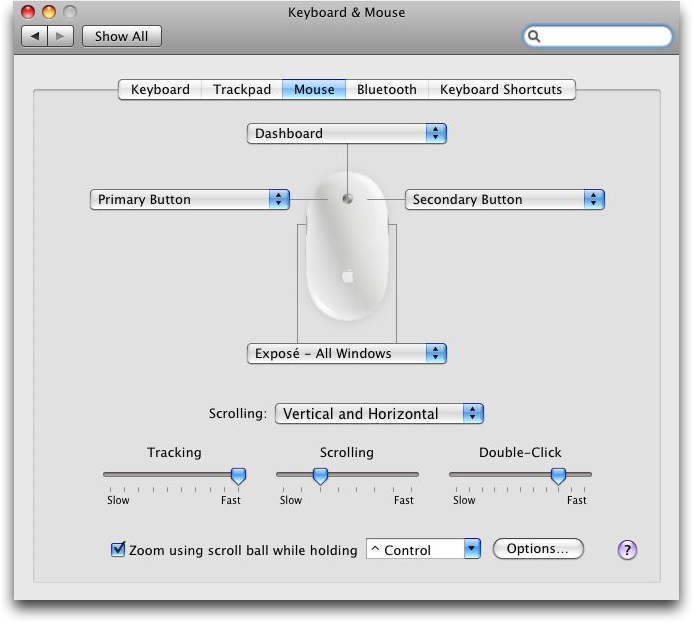


 odd McMullen is a cinematographer, getting to work on the third season of Friday Night Lights. His first camera gig was on Martin Scorcese's Casino, and includes everything from The Green Mile to Infamous. This picture is of his "acting" debut, getting tossed into a dumpster in American Wedding. In his free time, he's


